
Free download
Download it free.
Download the PDF to keep or print.
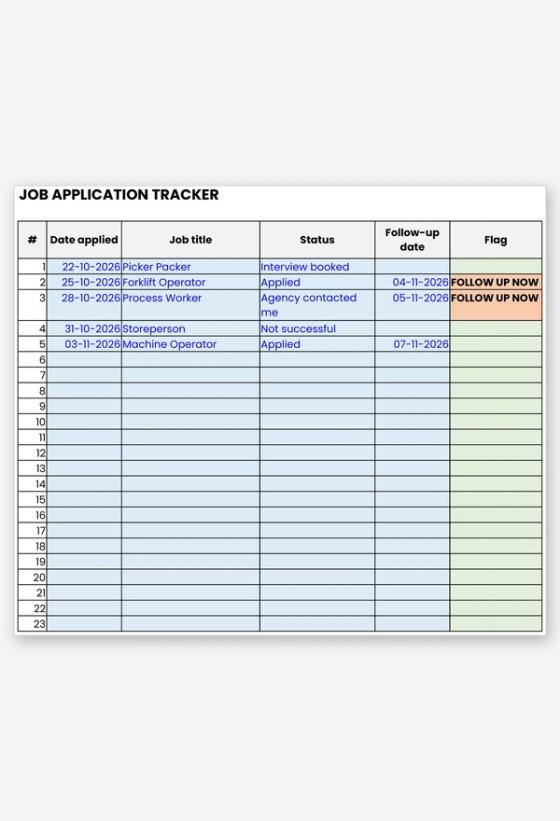
Printable tracker (editable copy is a Google Sheet, linked above)
A job application tracker keeps every application in one place, so nothing slips when you are applying for several warehouse, factory or trades jobs at once. This free spreadsheet records where you found each job, which CV you sent, what happened next and when to follow up, and it flags the ones that are due.
Why track your applications
People who apply to several agencies and employers quickly lose track of who has replied, which CV went where, and who needs a nudge. A short follow-up a few working days after applying can make the difference between being remembered and being missed.
A tracker also shows your search honestly. Counting applications, replies and interviews tells you whether to apply more widely or sharpen your CV and interview preparation.
What the tracker includes
- Tracker: date applied, job title, employer or agency, where you found it, suburb, pay or hours, contact, CV version, cover letter sent, status, interview date, next action, follow-up date and notes.
- Drop-down statuses: Planned, Applied, Agency contacted me, Interview booked, Interviewed, Offer received, Started, Not successful and Withdrawn.
- Follow-up flag: shows FOLLOW UP NOW when the date has arrived and the job is still waiting on a reply.
- Summary: counts by status, applications in the last 7 and 30 days, and your reply rate.
- Print Sheet and Tips: a pen-and-paper version and a few practical habits.
How to use it
Add a row the moment you apply, then set a follow-up date a few working days ahead. After each call or email, update the status and write a note. Keep your documents ready so you can say yes quickly when work is offered, and send your details through the submit your CV page for Chandler roles.
Chandler's candidate FAQ says only suitable candidates are contacted because of high application numbers, and that consultants try to reach eligible candidates within 1 to 3 days. Use that as a guide when you set your first follow-up date.
Related Resources
- Free CV templates
- Warehouse cover letter and application kit
- Warehouse and factory interview preparation pack
- Reference list and referee request kit
- Why work with a recruitment agency as a job seeker
- Current jobs on the job board
Frequently Asked Questions
How soon should I follow up on an application?
A few working days is a common rule of thumb. A short, polite call or message asking whether they need anything else from you is enough.
Can I use this on my phone?
The Google Sheets copy works in a browser on a computer or phone, and you can download it as an Excel file from the File menu. The PDF has a printable sheet for filling in by hand.
Does the tracker send reminders?
It shows a red FOLLOW UP NOW flag when you open the file, but it does not send messages. Check it when you start your day.
What should I put in the CV version column?
A short name such as Forklift CV or General Labourer CV. It helps you see which version gets more replies.
Is it safe to keep passwords in the file?
No. Keep passwords, bank details, tax file numbers and ID numbers out of the file.
One Row Per Application, One Date Per Follow-Up
Download the tracker, add the jobs you have already applied for, and set your first follow-up dates today. Then browse current jobs and keep adding rows.