
Free download
Download it free.
Download the PDF to keep or print.
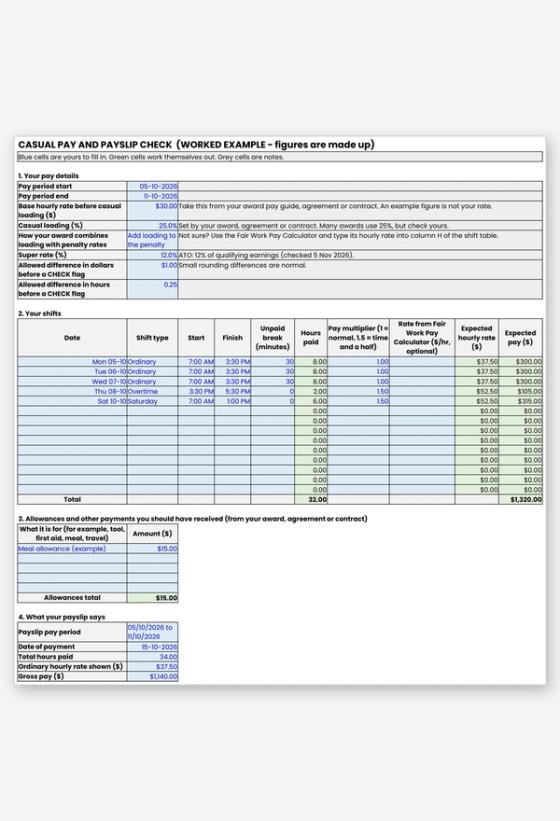
Printable worksheet (editable copy is a Google Sheet, linked above)
A casual pay calculator is only useful if it uses your own rate, so this free worksheet starts with yours. Enter your shifts, your base rate and your casual loading, and it works out the pay you should expect. It then compares that with your payslip for hours, hourly rate, gross pay and super, and checks that the payslip shows the details the Fair Work Ombudsman says it must.
Why check a casual payslip
Casual pay has more moving parts than a flat hourly rate. There is a base rate, a casual loading, penalty or overtime rates for some shifts, and sometimes allowances. A missed break or a wrong rate on one shift can repeat for weeks before anyone notices.
The Fair Work Ombudsman says employers must keep time and wage records for 7 years and issue a payslip within one working day of payday. The record-keeping and pay slips fact sheet lists what a payslip must show, and the worksheet turns that list into a quick check.
What the worksheet includes
- Pay Check: your pay details, a shift table for up to 14 shifts, allowances, your payslip figures, and a side-by-side comparison with OK or CHECK flags.
- Payslip checklist: eleven items a payslip should show, with a count of anything missing.
- Worked Example: a filled-in sheet with made-up numbers, so you can see how a CHECK flag looks.
- Next Steps: who to contact and what to say if something looks wrong.
- Rates and Sources: each rule used, with its source link and the date it was checked.
How to use it
Find your base rate and loading in your contract, in your award's pay guide, or in the Fair Work Pay and Conditions Tool. Enter your shifts from your own hours log, choose how your award combines loading and penalty rates, and type in your payslip figures. If you are unsure about a penalty rate, use the Fair Work tool and paste its hourly rate into the optional column.
Super on your payslip
The ATO says the super guarantee rate is 12% of qualifying earnings. From 1 July 2026 employers must pay super so it reaches your fund within 7 business days after each payday, with some exceptions such as for new employees. The worksheet estimates super on your ordinary-time pay only, because the ATO says overtime payments are not qualifying earnings. Read the ATO's guide to paying super and check your fund as well as your payslip.
Pay questions at Chandler Personnel
Chandler's candidate FAQ says to contact your consultant first about pay questions, and explains the pay cycle and when payslips are emailed. Read the current page, because timings can change.
Related Resources
- Fair Work Pay and Conditions Tool
- Fair Work record-keeping and pay slips fact sheet
- ATO guide to paying super
- Weekly hours log and timesheet tracker
- Chandler candidate FAQ
- Current jobs on the job board
Frequently Asked Questions
Does this worksheet include pay rates?
No. Your award, agreement or contract sets your rate, so you enter it yourself. The figures on the Worked Example sheet are made up.
Which casual loading should I use?
Use the one in your contract, agreement or award. The Fair Work Ombudsman says casual employees are paid a casual loading or a specific casual rate, and to check your award or agreement. Many awards use 25%, but confirm yours.
What if my payslip is lower than the worksheet says?
Check your own entries first, then ask your consultant or payroll contact, giving the dates, hours and amounts. If it is not fixed, you can call the Fair Work Infoline on 13 13 94 for free advice through the Fair Work contact page.
Can I use it on my phone?
The Google Sheets copy works in a browser on a computer or phone, and you can download it as an Excel file from the File menu. The PDF is a printable version for filling in by hand.
Is my information stored anywhere?
No. The file stays on your own device. It does not ask for your tax file number, bank details or ID.
Check One Payslip Before the Next Pay Run
Download the worksheet, enter last week's shifts, and see whether your payslip matches. When you are ready for your next placement, browse current jobs or send your CV.