
Free download
Download it free.
Download the Word file to fill in on your computer, or the PDF to print.
Editable log
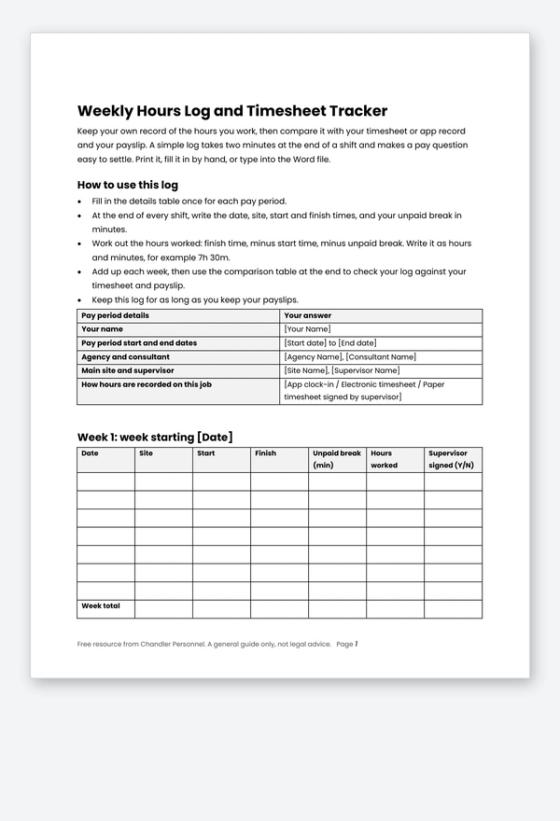
A weekly timesheet template is the simplest way to protect your pay. This free hours log gives you a place to write each shift's date, site, start, finish and unpaid break, then a table to compare your own record with the timesheet or app record and your payslip. It takes two minutes at the end of a shift.
Why keep your own record
Most pay problems are small and repeat: a break that was shorter than recorded, a shift that ran late, a missed timesheet. A simple personal log means you can show exactly what you worked, and ask a precise question instead of a vague one.
The Fair Work Ombudsman says employee records must be kept for 7 years and that employers must make copies available when an employee or former employee asks. A payslip must be issued within one working day of payday. The record-keeping guide explains what employers must record.
What the log includes
- A pay period details table with agency, site, supervisor and how hours are recorded.
- Weekly tables with date, site, start, finish, unpaid break, hours worked and supervisor sign-off, with a weekly total.
- A comparison table for log hours, timesheet or app hours, and payslip hours.
- A five-step guide for what to do when the hours do not match.
- A short section for people who work through Chandler Personnel.
How to use it
Print the Word file or the PDF, or type straight into the Word file. Fill in the details table once, then add a line after each shift. At the end of each pay period, copy the weekly totals into the comparison table. Keep the log with your payslips.
Working through Chandler Personnel
Chandler's candidate FAQ says staff clock in and out through the Chandler mobile app on site and should add the meal break before clocking out. It also says manual timesheets apply only to selected clients and only when a consultant advises it, and that they must be filled in correctly and signed by a supervisor. Your log is a personal backup, not a replacement for those records.
Related Resources
- Casual pay calculator and payslip check worksheet
- Fair Work record-keeping guide
- Fair Work Pay and Conditions Tool
- First day on site checklist for agency workers
- Chandler candidate FAQ
- Current jobs on the job board
Frequently Asked Questions
Do I still need this if I clock in with an app?
It still helps. An app records the time you clocked in and out, while your log also records your unpaid break and any short shift. A personal record makes a payslip query quick to settle.
How do I count unpaid breaks?
Write the number of minutes you were actually off the clock, then subtract it from the time between start and finish. Your award or agreement sets break rules, so check it if you are unsure.
How long should I keep my log?
Keep it as long as you keep your payslips. Employers must keep records for 7 years, so a log can be useful if a question comes up later.
What if my supervisor will not sign my timesheet?
Do not guess. Tell your consultant or agency straight away, and note the date and who you spoke to. Chandler's FAQ says manual timesheets must be signed by a supervisor.
Two Minutes a Shift Saves a Pay Query
Download the log and fill in your next shift tonight. When your payslip arrives, compare the hours, and use the casual pay and payslip check worksheet if the amounts need checking.