
Free download
Download it free.
Download the PDF to keep or print.
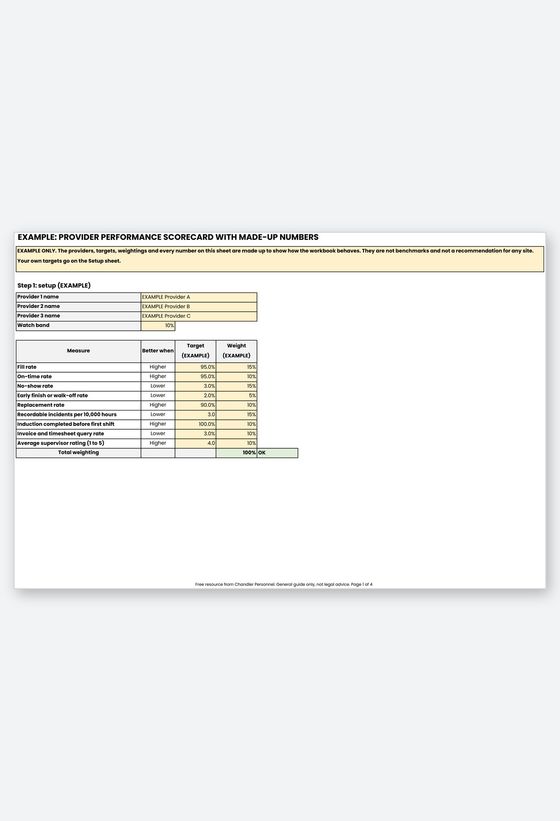
Printable reference (Excel file linked above)
A labour hire performance scorecard turns a provider's month into a few numbers you can compare with your own targets: how many shifts were filled, how many workers turned up on time, how many walked off, and how many invoice lines you had to query. This free Excel workbook is for host employers who already use a labour hire provider and want a steady, fair way to review it.
Enter simple monthly counts for up to three providers and set your own targets. The Scorecard flags each measure as Meets, Watch or Action, gives a weighted score out of 100 and compares the latest month with the previous one. Every cell is editable.
Why review a labour hire provider every month
A provider that fills nine shifts in ten can still cost you if the tenth is a night shift nobody covers, or if new starters reach the floor before their induction. Those problems sit in different records. Put side by side each month, they show whether a provider is improving or drifting.
Chandler's guide to workforce KPIs for manufacturing site managers sets out the same approach: use records you already hold, set targets from your own baseline, and review monthly. The post on using multiple labour hire suppliers at peak adds that every supplier is scored on the same measures from the same data.
Safety belongs on the scorecard because the duty is yours as well. WorkSafe Victoria says a host employer is taken to be the employer of a labour hire worker and owes the same duties as it does to any other employee. A recordable incident count never replaces notifying the regulator.
What is inside the workbook
- Read Me: four steps to use it and how the score is built.
- Setup: provider names, your own recordable incident definition, a target and weighting for each measure, and a check cell for weightings that must add to 100%.
- Monthly Data: one row per provider per month for shifts, arrivals, no-shows, replacements, hours worked, incidents, near misses, inductions, queried lines, invoices, supervisor rating and notice given.
- Scorecard: each measure against its target with Meets, Watch or Action flags, a weighted score out of 100 and a latest month trend.
- Review Notes: issue, evidence, agreed action with the provider, owner, due date and a Closed Y/N column.
- Worked Example: made-up providers over three months, labelled EXAMPLE.
- Sources: the definitions used, with links and check dates.
How to use it
- Open Setup, name your providers, then enter a target and weighting for each measure from your own last few months of data.
- After month end, add one row per provider on Monthly Data from your rosters, timesheets, incident register and invoices.
- Read the Scorecard, then pick one provider in the blue cell to see the latest month against the previous month.
- Log each missed target in Review Notes, agree the action with the provider, and check progress at the next monthly meeting.
Small numbers swing. When a provider supplies only a few workers, one bad day can move a monthly rate a long way, so read the whole review period before reacting to a single month.
Who should use it
Site, operations and procurement managers in Victoria and New South Wales who use agency workers. If you have not chosen a provider yet, start with the Free Labour Hire Agency Selection Scorecard.
Related Resources
- Free Labour Hire Agency Selection Scorecard for choosing a provider before you sign
- Free Workforce Absence and Turnover Tracker for absence on your own team
- Free Shift Handover and Timesheet Approval Pack for cleaner timesheet and handover records
- workforce KPIs for manufacturing site managers, the blog post behind the definitions
- how to split a peak order between several suppliers and score each one
- WorkSafe Victoria guidance for labour hire hosts on shared safety duties
- SafeWork NSW incident notification for what to report to the regulator
Frequently Asked Questions
Does the workbook include target figures?
No. No law or regulator sets targets for fill rate, on-time rate, no-shows or invoice queries, so the targets are yours and start blank. The Worked Example uses made-up targets that are not benchmarks.
How is it different from the agency selection scorecard?
The selection scorecard helps you compare providers before you sign. This workbook measures a provider you already use, month after month, using your own records.
What counts as a recordable incident?
You decide, and you write the definition on the Setup sheet so it stays the same every month. A recordable incident count is separate from notifiable incidents, which must be reported to WorkSafe Victoria or SafeWork NSW as their pages describe.
Can I compare more than one provider?
Yes. Up to three providers, twelve months each, shown side by side using the same definitions.
Is this legal advice?
No. It is a general guide, not legal advice. It helps you organise your own review and does not replace your labour hire agreement or advice on your obligations.
Review the work, not the rumour
A monthly scorecard gives you facts to take to your provider and a record of what was agreed. If you need more labour hire cover while you review your current arrangements, you can request staff from Chandler Personnel, a Melbourne labour hire and permanent recruitment business.